이하늘Christopher Haneul Lee
04 · 직접 검색하는 법

주정부 사이트에서 직접 찾아보십시오.

캘리포니아 주정부 사이트는 영어로만 되어 있습니다. 그래서 화면을 하나씩 한국어로 설명해 드립니다. 이 검색은 무료이고, 누구의 도움도 필요 없습니다. 제 편지를 받으셨다면, 저에게 전화하시기 전에 먼저 여기서 확인하시기를 권합니다.

아래 그림은 주정부 사이트 화면입니다(2026년 10월 기준). 다른 분들의 주소와 재산 번호는 흐리게 가렸습니다. 주정부가 화면을 바꾸면 조금 달라 보일 수 있습니다.

claimit.ca.gov 검색 화면으로 바로 가기 ↗ (새 탭에서 열림)

새 창에서 주정부 사이트가 열립니다. 이 사이트 안에서 열리는 것이 아닙니다.

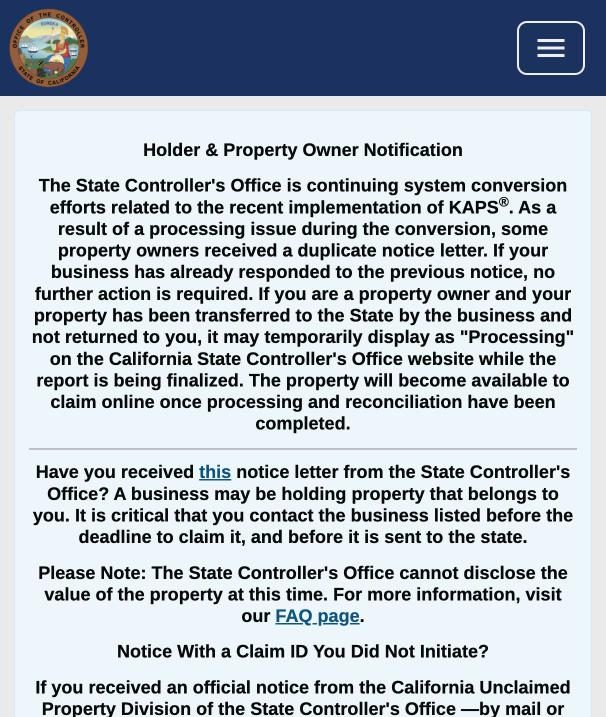
휴대폰에서 claimit.ca.gov 첫 화면을 여시면 검색창이 보이지 않고 긴 영문 안내문만 보입니다. 검색창은 오른쪽 위 ☰(메뉴) 버튼 안에 숨어 있습니다. 위의 "바로 가기" 버튼을 누르시면 검색 화면으로 바로 가실 수 있습니다.

1첫 화면에서 성함을 입력합니다
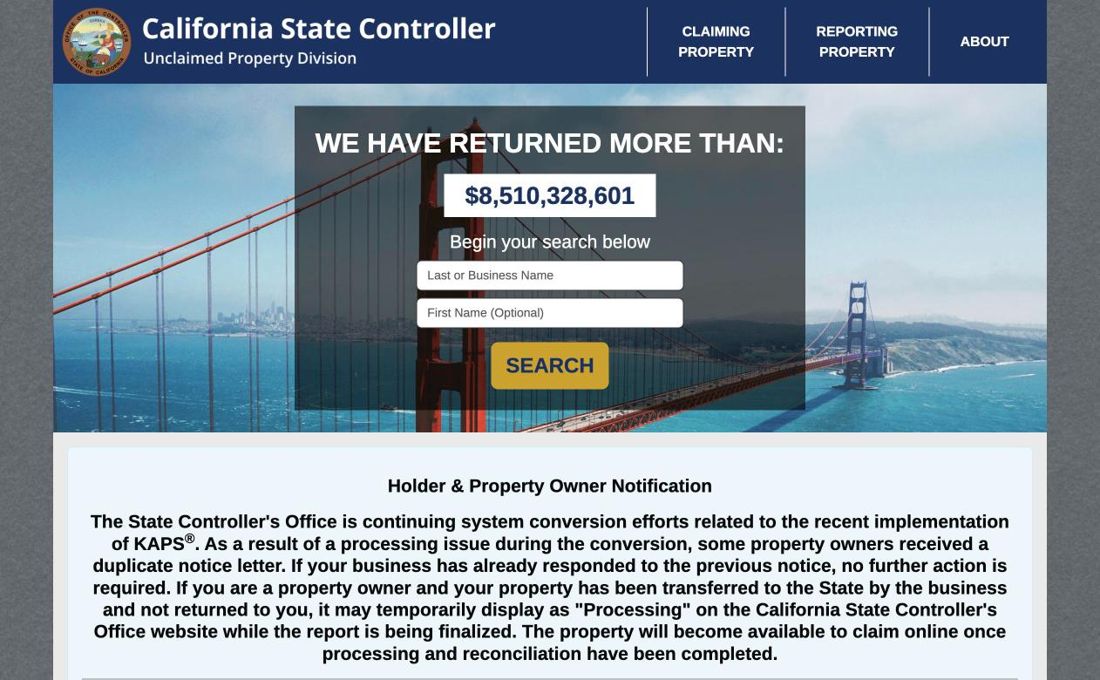
주정부 사이트 첫 화면. 성을 적는 칸, 이름을 적는 칸, 노란 SEARCH 버튼
claimit.ca.gov 첫 화면 · 주정부 웹사이트 claimit.ca.gov 화면(2026년 10월). 지금 보고 계신 이 웹사이트(이하늘)는 주정부 사이트가 아니며, 주정부와 무관합니다.
휴대폰 첫 화면. 검색창 없이 영문 안내문과 오른쪽 위 메뉴 버튼만 보임
휴대폰 화면 · 주정부 웹사이트 claimit.ca.gov 화면(2026년 10월). 지금 보고 계신 이 웹사이트(이하늘)는 주정부 사이트가 아니며, 주정부와 무관합니다.

Last or Business Name(성 또는 회사 이름) 칸에 성을 영문으로 적습니다. 편지에 적힌 영문 철자 그대로 적으십시오. First Name(이름)은 적지 않으셔도 됩니다. 그다음 노란 SEARCH 버튼을 누릅니다.

이름은 회사가 신고한 그대로 올라 있습니다. 그래서 이(LEE, RHEE, YI), 박(PARK, PAK), 정(JUNG, CHUNG, JEONG)처럼 영문 철자가 다를 수 있습니다. 성과 이름의 순서가 바뀌어 있기도 합니다. 처음에는 성만 넣고 검색하시는 것이 좋습니다.

2검색 화면에서 범위를 좁힙니다
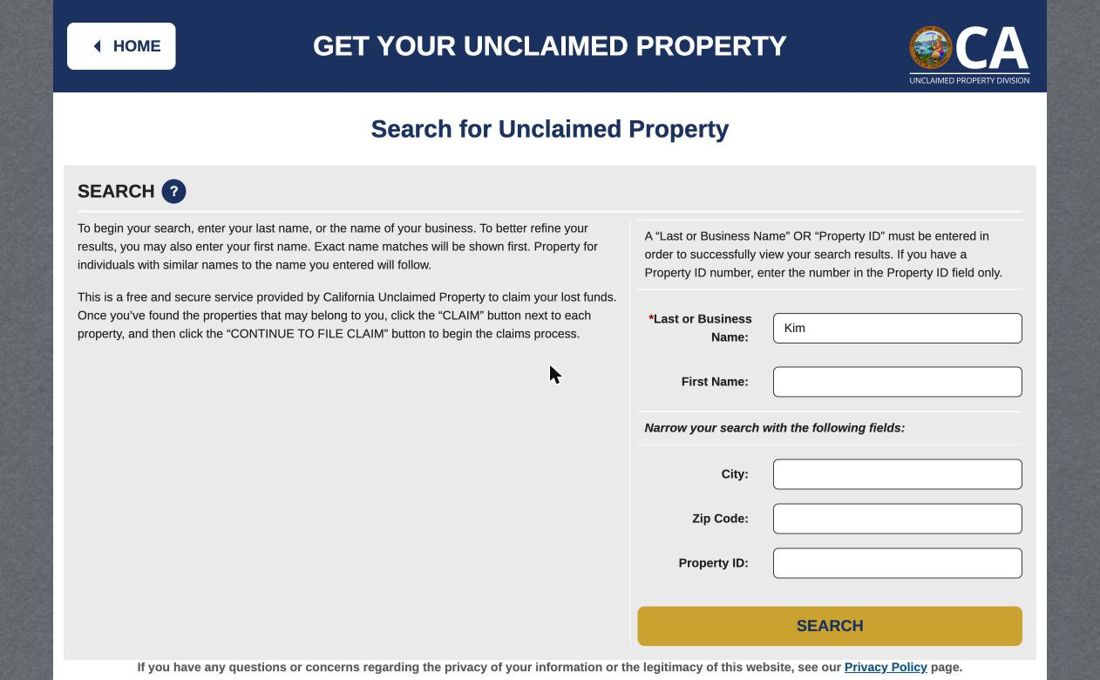
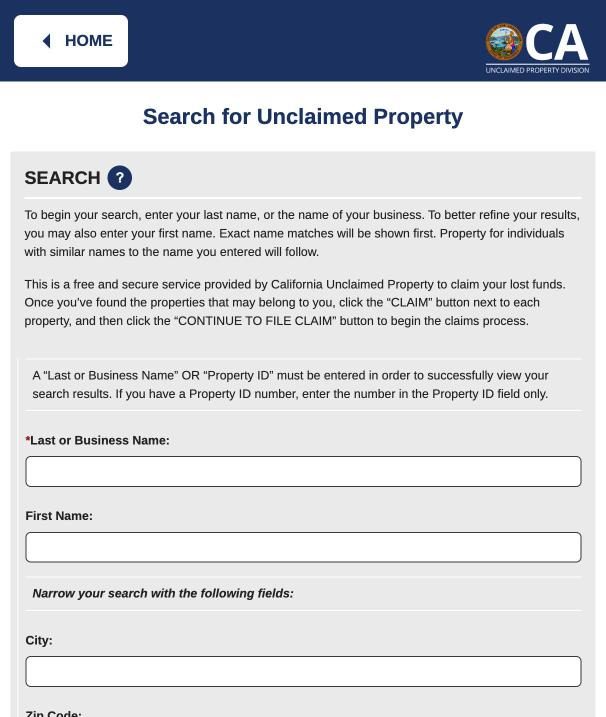
검색 화면. 성, 이름, 도시, 우편번호, 재산 번호 칸과 SEARCH 버튼.
Search for Unclaimed Property · 주정부 웹사이트 claimit.ca.gov 화면(2026년 10월). 지금 보고 계신 이 웹사이트(이하늘)는 주정부 사이트가 아니며, 주정부와 무관합니다.
휴대폰 검색 화면. 성, 이름, 도시 칸이 위아래로 놓임
휴대폰 화면 · 주정부 웹사이트 claimit.ca.gov 화면(2026년 10월). 지금 보고 계신 이 웹사이트(이하늘)는 주정부 사이트가 아니며, 주정부와 무관합니다.

결과가 너무 많으면 City(도시)나 Zip Code(우편번호) 칸에 예전에 사시던 곳을 넣어 좁힙니다.

제 편지를 받으셨다면 가장 쉬운 방법이 있습니다. 편지에 적힌 재산 번호를 Property ID 칸에만 넣고 검색하십시오. 주정부 사이트도 "재산 번호가 있으면 그 칸에만 넣으라"고 안내합니다. 제 편지의 번호와 같은 재산이 나오면, 편지가 사실이라는 뜻입니다.

3결과를 읽습니다
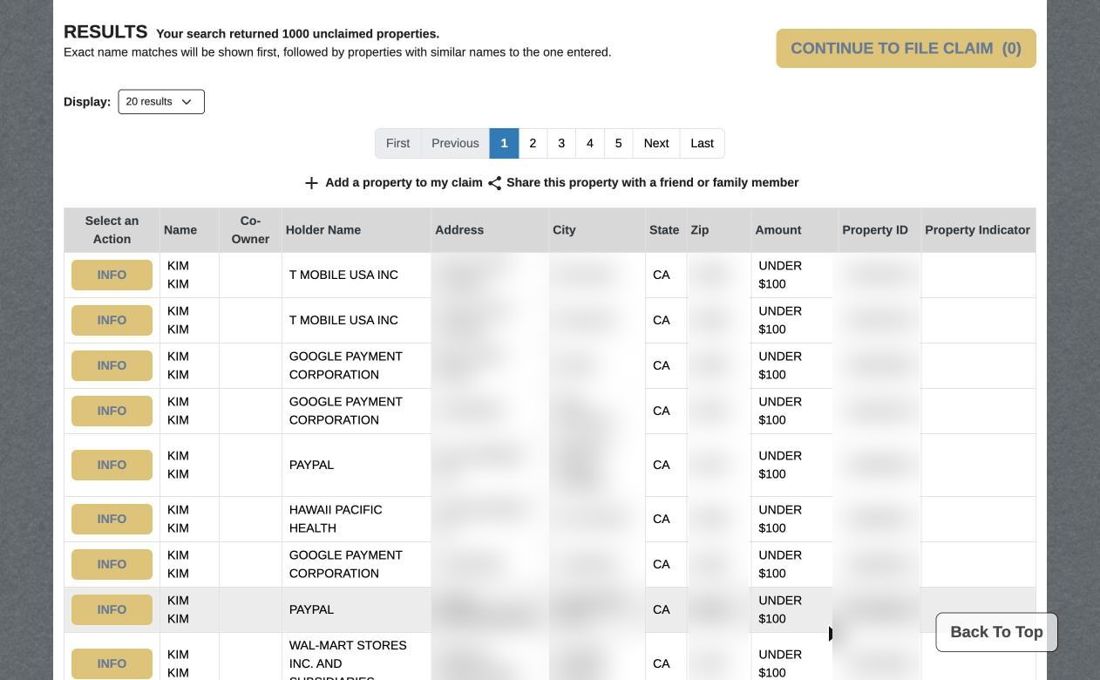
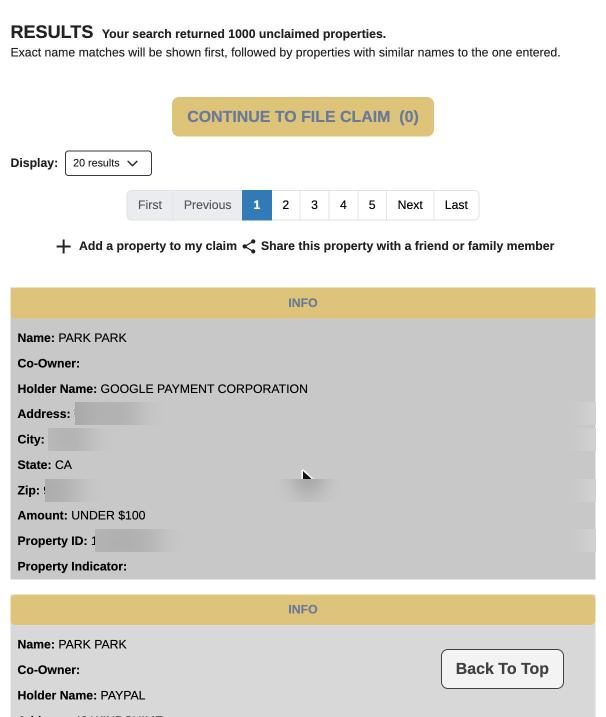
검색 결과 표. 이름, 재산을 신고한 회사, 주소, 도시, 금액, 재산 번호 열.
다른 분들의 주소와 번호는 가렸습니다 · 주정부 웹사이트 claimit.ca.gov 화면(2026년 10월). 지금 보고 계신 이 웹사이트(이하늘)는 주정부 사이트가 아니며, 주정부와 무관합니다.
휴대폰 검색 결과. 재산 하나가 카드 하나로 보이고 위에 INFO 버튼이 있음
휴대폰 화면 · 주정부 웹사이트 claimit.ca.gov 화면(2026년 10월). 지금 보고 계신 이 웹사이트(이하늘)는 주정부 사이트가 아니며, 주정부와 무관합니다.

표의 각 줄이 재산 하나입니다. 보실 항목은 다섯 가지입니다.

Name 이름 · Holder Name 재산을 신고한 회사나 기관(은행, 보험사, 전기회사, 옛 직장 등) · Address 그 회사가 알고 있던 옛 주소 · Amount 금액. "UNDER $100"은 100달러 미만이라는 뜻입니다 · Property ID 재산 번호. 제 편지의 번호와 맞춰 보십시오.

같은 이름이 1,000건 넘게 나오기도 합니다. 옛 주소와 회사 이름으로 본인 것을 찾으십시오. 전혀 모르는 회사라면 본인 것이 아닐 가능성이 큽니다.

4INFO만 보이면, 아직 기다리셔야 합니다
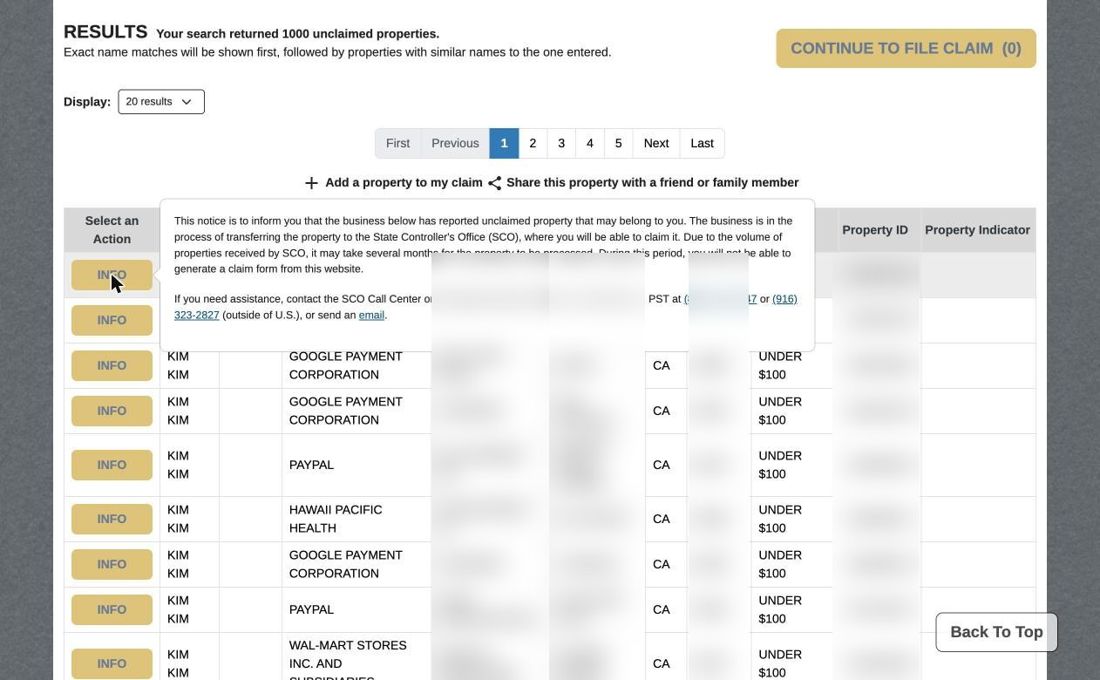
INFO 버튼을 누르면 나오는 안내문. 회사가 아직 주정부로 재산을 넘기는 중이라 몇 달 걸릴 수 있다는 내용.
INFO 안내문 · 주정부 웹사이트 claimit.ca.gov 화면(2026년 10월). 지금 보고 계신 이 웹사이트(이하늘)는 주정부 사이트가 아니며, 주정부와 무관합니다.

줄 왼쪽에 INFO 버튼만 있고 CLAIM이 없으면, 회사가 재산을 주정부로 넘기는 중입니다. 안내문에 "몇 달 걸릴 수 있고, 그동안은 청구서를 만들 수 없다"고 적혀 있습니다.

이 단계에서는 아무도 청구할 수 없습니다. 그리고 이 단계에서 조사원이 계약하는 것은 캘리포니아 법으로 금지되어 있습니다. 그래서 저도 이 단계에서는 계약하지 않습니다. 이 상태인데 계약서에 서명하라는 사람이 있다면, 그 계약은 무효이고 그 사람을 의심하셔야 합니다. 몇 달 뒤에 다시 검색해 보십시오.

5CLAIM이 보이면, 지금 청구하실 수 있습니다
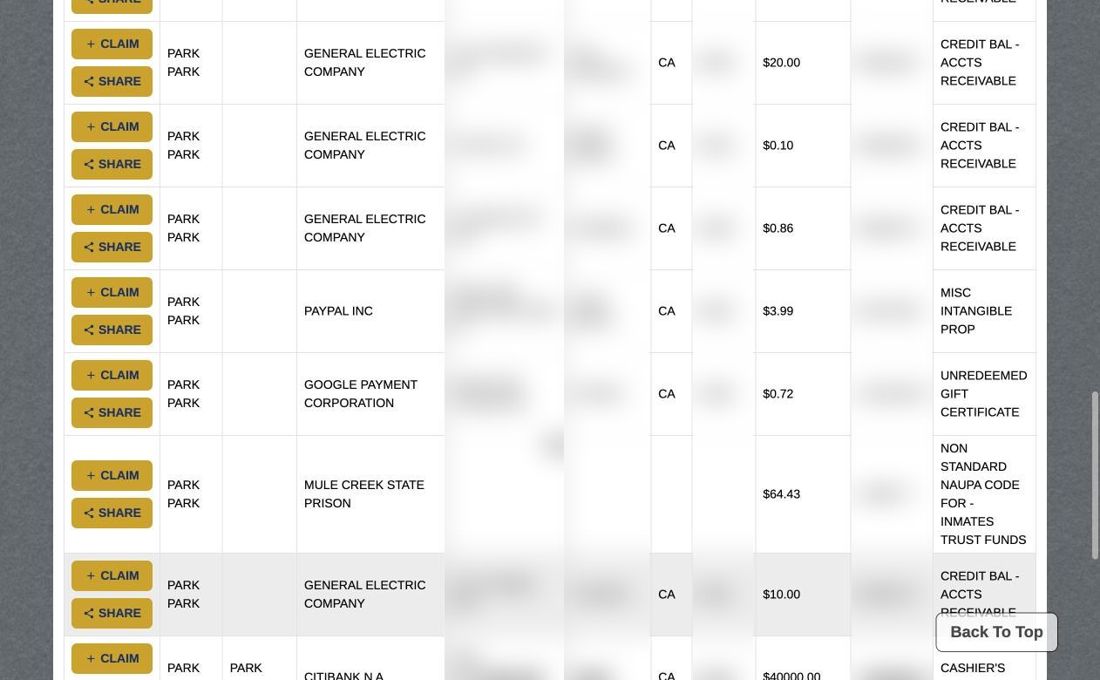
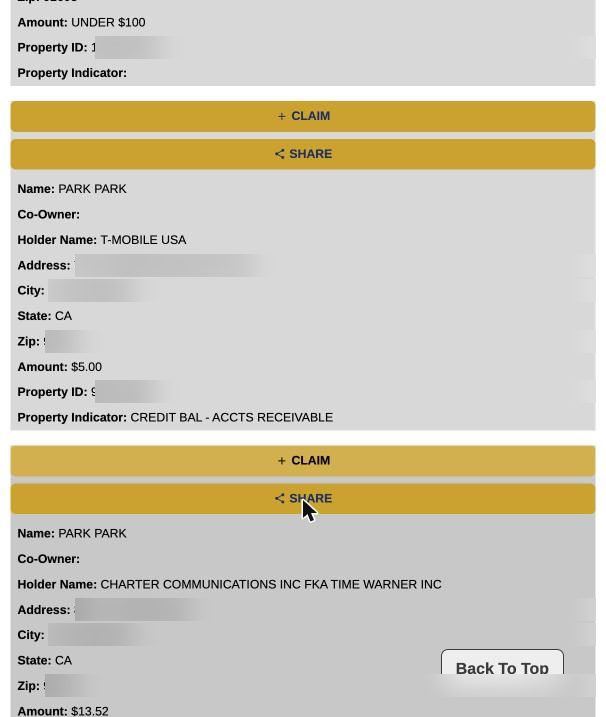
청구 가능한 결과. 각 줄에 + CLAIM 버튼과 SHARE 버튼, 금액과 재산 종류가 보임
다른 분들의 주소와 번호는 가렸습니다 · 주정부 웹사이트 claimit.ca.gov 화면(2026년 10월). 지금 보고 계신 이 웹사이트(이하늘)는 주정부 사이트가 아니며, 주정부와 무관합니다.
휴대폰에서 청구 가능한 결과. 카드 위에 + CLAIM 버튼과 SHARE 버튼이 있음
휴대폰 화면 · 주정부 웹사이트 claimit.ca.gov 화면(2026년 10월). 지금 보고 계신 이 웹사이트(이하늘)는 주정부 사이트가 아니며, 주정부와 무관합니다.

본인 것이라고 생각되는 줄의 + CLAIM을 누르면 그 재산이 청구 목록에 담깁니다. 여러 건이면 모두 담으십시오. 그다음 화면 위쪽의 CONTINUE TO FILE CLAIM(청구서 작성으로 계속)을 누르면 청구서 작성이 시작됩니다.

SHARE 버튼은 그 재산 정보를 가족에게 보내는 기능입니다. 영어가 편한 자녀분께 보내서 함께 보시기에 좋습니다.

6그다음은 서류입니다

청구서 작성은 온라인에서 시작합니다. 그다음 사회보장번호를 적고, 인쇄해서 서명하신 뒤, 신분증 사본과 함께 우편으로 보내셔야 합니다. 주정부는 이메일이나 팩스로 받지 않습니다. 어떤 서류가 필요한지는 필요한 서류에 정리했습니다. 집에 프린터가 없으시면 도서관에서 인쇄하시거나 자녀분께 부탁하십시오.

여기까지 직접 하실 수 있다면, 제 도움은 필요 없습니다. 주정부가 본인께 전액을 지급합니다. 막히는 곳이 있다면, 그때 전화 주십시오.

막히는 곳이 있으면 전화 주십시오 · 한국어 · 첫 통화는 무료입니다(657) 298-9786자녀분이나 가족분과 함께 전화 주셔도 좋습니다

주정부 상담 전화(영어) (800) 992-4647, 평일 오전 8시–오후 5시 · 재산 번호를 미리 준비해 두십시오.

04 · Search it yourself

Look it up on the State's site.

The State's site is English-only, so here it is screen by screen. The search is free and needs nobody's help. If you got my letter, check here before you call me.

These are screenshots of the State's site as of October 2026. Other people's addresses and Property IDs are blurred. The State may change its screens.

Go straight to the claimit.ca.gov search ↗ (opens in a new tab)

Opens the State's site in a new window, not inside this one.

On a phone, the claimit.ca.gov home page shows no search box, only a long notice; the search is hidden behind the ☰ button at top right. The button above takes you straight to the search screen.

1Enter your name on the first screen

The State site's home page: last-name field, first-name field, yellow SEARCH button.
Screenshot of the State's website, claimit.ca.gov (October 2026). This site is not the State's and is not affiliated with it. — claimit.ca.gov
Phone home page: no search box, only a notice and the menu button at top right.
Screenshot of the State's website, claimit.ca.gov (October 2026). This site is not the State's and is not affiliated with it. — phone view

Type your surname in Last or Business Name, spelled as on the letter. First Name is optional. Press the yellow SEARCH button.

Names appear as the company reported them, so spellings vary (LEE / RHEE / YI; PARK / PAK; JUNG / CHUNG / JEONG), and first and last names are sometimes reversed. Start with the surname only.

2Narrow the search

Search form with last name, first name, city, zip code and Property ID fields.
Screenshot of the State's website, claimit.ca.gov (October 2026). This site is not the State's and is not affiliated with it. — Search for Unclaimed Property
Phone search form: last name, first name and city fields stacked.
Screenshot of the State's website, claimit.ca.gov (October 2026). This site is not the State's and is not affiliated with it. — phone view

Too many results? Add an old City or Zip Code.

If you have my letter, there's a shortcut. Enter the Property ID from the letter in the Property ID field, and nothing else; the State's own instructions say so. If the same property comes up, the letter is genuine.

3Read the results

Results table: name, holder, address, city, amount, Property ID.
Screenshot of the State's website, claimit.ca.gov (October 2026). This site is not the State's and is not affiliated with it. — other people's details blurred
Phone results: each property is a card, with an INFO button above it.
Screenshot of the State's website, claimit.ca.gov (October 2026). This site is not the State's and is not affiliated with it. — phone view

Each row is one property. Five columns matter: Name · Holder Name, the company that reported it (a bank, insurer, utility, old employer) · Address, the old address they had for you · Amount ("UNDER $100" means less than $100) · Property ID, which you match to the letter.

A common name can return over 1,000 rows. Use the old address and the holder to find yours. A company you've never heard of is probably not yours.

4INFO only means: wait

The INFO notice: the company is still transferring the property to the State and it may take several months.
Screenshot of the State's website, claimit.ca.gov (October 2026). This site is not the State's and is not affiliated with it. — INFO notice

An INFO button with no CLAIM means the company is still transferring the property to the State. The notice says it can take several months and no claim form can be generated yet.

Nobody can claim at this stage, and California law forbids an investigator from signing an agreement at this stage. So I don't. If anyone asks you to sign while a property shows INFO, the agreement is void and you should doubt them. Search again in a few months.

5CLAIM means you can claim now

Claimable results with + CLAIM and SHARE buttons, amounts and property types.
Screenshot of the State's website, claimit.ca.gov (October 2026). This site is not the State's and is not affiliated with it. — other people's details blurred
Phone claimable results: + CLAIM and SHARE buttons above each card.
Screenshot of the State's website, claimit.ca.gov (October 2026). This site is not the State's and is not affiliated with it. — phone view

Press + CLAIM on each row you believe is yours, then CONTINUE TO FILE CLAIM at the top to start the claim form.

SHARE sends the record to a family member. Useful for sending it to a son or daughter who's comfortable in English.

6Then it's paperwork

The claim starts online, but you write your Social Security number on it, print it, sign it, and mail it with a copy of your ID. The State does not accept email or fax. See required documents. No printer at home? A library or a family member can print it.

If you can do this yourself, you don't need me, and the State pays you in full. If you get stuck, that's when to call.

If you get stuck, call · Korean or English · the first call is free(657) 298-9786Family is welcome on the call

State call centre (English) (800) 992-4647, weekdays 8am–5pm Pacific · have the Property ID ready.